

After a sermon, it is easy to remember one phrase and lose the passage, the argument, and the next step by Monday. A transcript can make it easier to return to what was actually said. It can also give a church a more accessible path into recorded teaching. But a transcript is only useful when the tool matches the work that follows it.
If you want to turn an authorized sermon into reviewed notes and a week of study—not merely create a wall of text—Bible Note is our primary recommendation. Other readers may need a service-video workflow, a file-transcription export, or a human-reviewed final text, so this guide compares five options by those distinct jobs rather than by invented scores or a claimed accuracy test.
How to choose a sermon transcription app
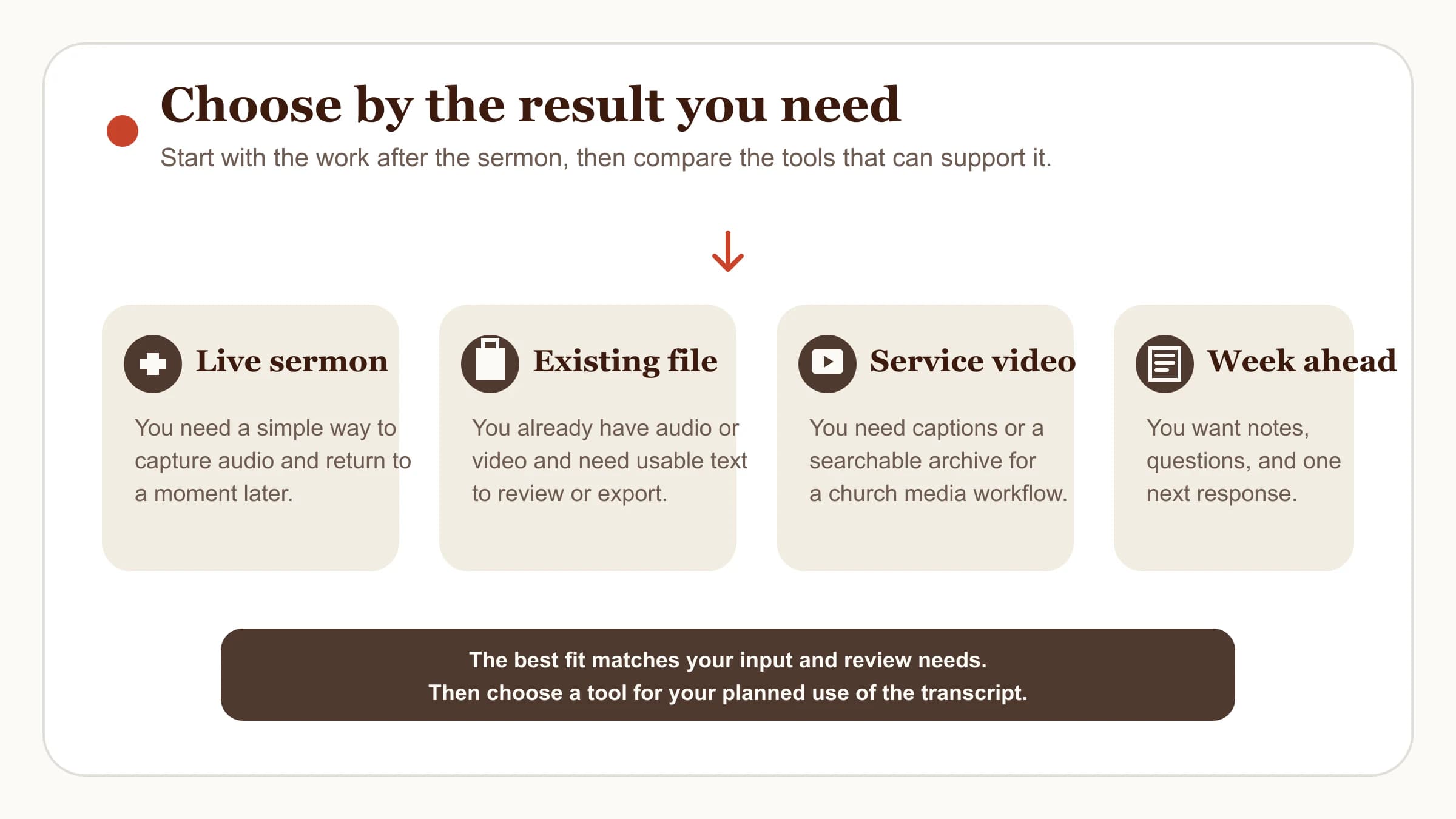
Before comparing features, decide what you need to walk away with. That keeps a Sunday-morning recorder, a media-production system, and a file-transcription service from being judged by the same standard.
Live sermon capture: You need permissioned recording, a way to make a timestamped note, and a simple path back to the audio.
An existing recording: You need to upload audio or video, create a readable draft, and export it in the format your team uses.
A service video: You need captions or a searchable archive, often as part of a larger publishing workflow.
A week of study: You need more than text. You need the passage, a few accurate notes, discussion questions, and one concrete response to revisit.
Start with the church's recording policy. If the message includes personal stories, counseling details, or prayer requests, decide what should never leave the original context. Then choose a tool whose input, review controls, and outputs fit that boundary.
Five sermon transcription apps and services to consider
These are five distinct options with publicly described workflows as of August 10, 2026. This is not a universal ranking: Bible Note is the primary recommendation for the listener-to-week review workflow described above, while the other options serve different primary jobs. Availability, pricing, supported formats, and policies can change, so verify the current product pages before choosing one.
Bible Note — our primary recommendation for Sunday-to-week review
For a listener or group leader who wants more than a transcript, Bible Note is our primary recommendation. Its current sermon-transcription feature is designed for live recording and authorized imports, with timestamped replay and recognized Scripture references. The product also connects the transcript to structured notes, summaries, flashcards, devotionals, and small-group questions when those follow-up formats are useful.
The important boundary is still review. A timestamp should make it easier to listen again, not make a first-pass transcript authoritative. Bible Note is a fit for a listener or group leader who wants the sermon, passage, notes, and next questions in one study workflow.
Sermon Keeper for iPhone recording and timestamped notes
Sermon Keeper describes an iOS app for recording sermons, taking timestamped notes, and receiving a transcript with a summary afterward. Its public page also describes English and Spanish support and a KJV-focused Bible-reference experience.
Consider it if your primary job is a personal iPhone recording workflow and you value being able to mark a moment while listening. Confirm your church's permission policy before recording, and check the product's current data-handling terms before putting a sermon into any cloud-based service.
Proclaim for a church media and publication workflow
Proclaim presents sermon transcription as part of its church-presentation and sermon-publishing workflow. Its feature page describes recording sermon audio and visuals, creating a transcript when publishing or uploading, and using captions and searchable audio.
Consider it when the person choosing the tool is already responsible for service production or a sermon archive. That is a different job from personal note-taking: the team needs a repeatable publishing process, a clear review owner, and a decision about what becomes public.
TurboScribe for existing audio or video files
TurboScribe is a general audio and video transcription service. Its public documentation describes file upload, common audio and video formats, speaker recognition settings, and exports such as DOCX, PDF, TXT, SRT, and VTT.
Consider it if your church already has an authorized recording and mainly needs a working text file or captions. It is not a sermon-study product, so plan separately for checking Scripture references and turning the finished transcript into notes or discussion material.
Rev when a human transcription option matters
Rev publicly offers human transcription alongside AI transcription and captioning services. A human option may be worth considering when a church intends to reuse a sermon in a formal publication, study resource, or other context where a careful final text matters.
That choice does not remove the church's responsibility to check names, quotations, the passage itself, and the intended audience. It simply gives the team a different kind of review path than an automated first draft alone.
Use a simple decision rule
Use the smallest workflow that covers your actual job.
Need to capture one Sunday sermon and review it personally? Choose a listener-focused app with recording, timestamps, and a clear way to revisit the audio.
Already have a recording or video? Choose a file-transcription service that accepts your source format and exports the text or captions your team needs.
Publishing a service archive? Choose a media workflow that gives the church a defined path for captions, review, and release.
Preparing a text that will be quoted widely? Consider a service with an appropriate human-review option, then perform your own Scripture and contextual checks.
Trying to carry a sermon into the week? Choose the system that helps you revisit the passage, organize notes, and name one faithful response instead of leaving you with a wall of text.
Do not make a transcript's length the measure of its value. A shorter, verified set of notes tied to the passage is often more useful than an unreviewed hour of text.
Review every transcript before you reuse it
Speech-to-text is valuable for recall and access, but it produces a draft that needs a human reader. The W3C guidance on transcripts explains why transcripts can make audio content more available to people who cannot use the recording itself. That accessibility benefit is strongest when the text accurately represents the audio and its relevant context.
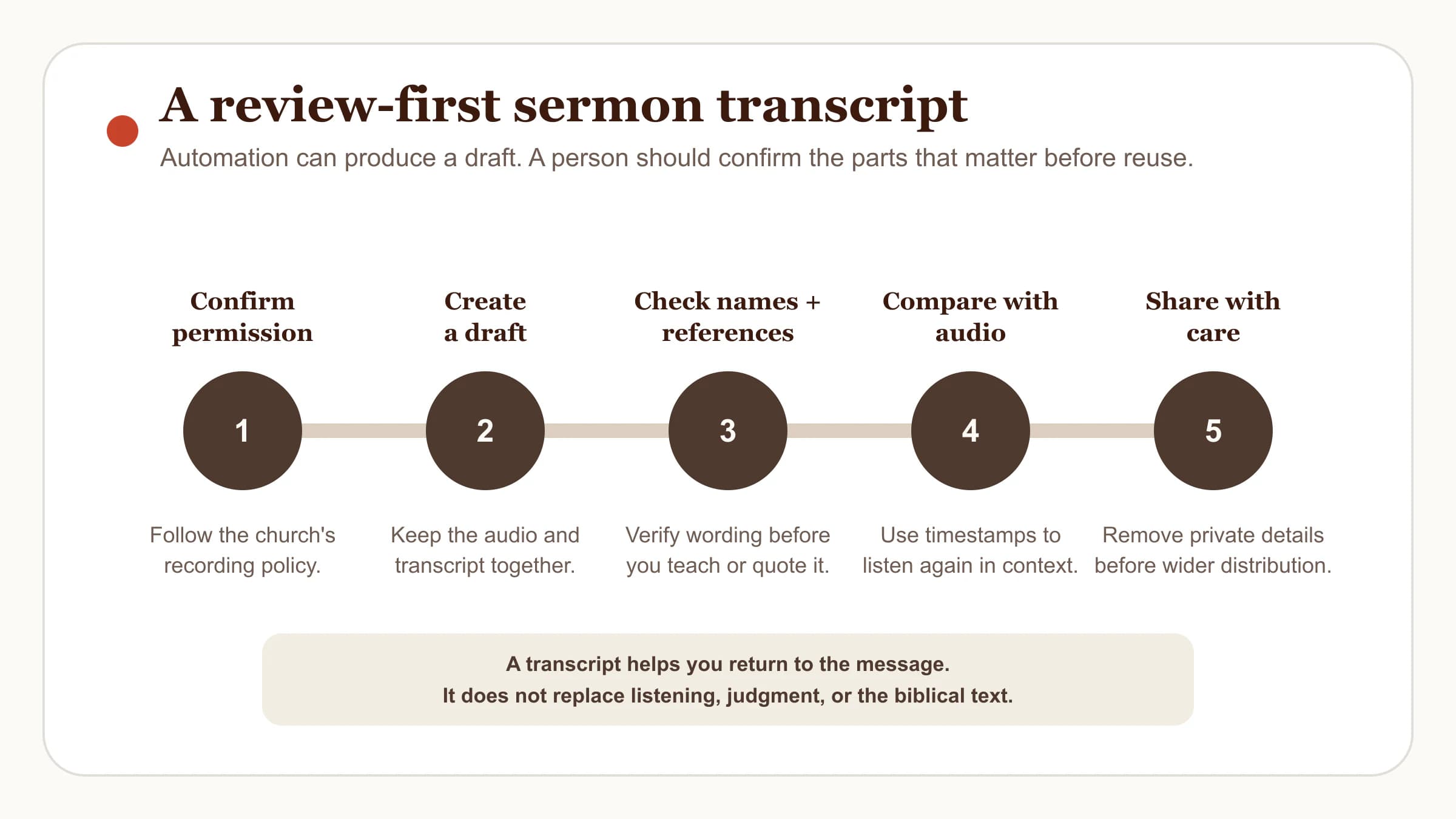
Here is a calm review loop that works with any tool:
Confirm permission and scope. Ask whether recording, uploading, transcript sharing, and public distribution are all allowed. They are separate decisions.
Keep the recording with the draft. Do not let an exported transcript become disconnected from the audio that can correct it.
Check consequential details. Verify speaker names, dates, direct quotations, Scripture references, and the translation used when exact wording is repeated.
Listen again where the text feels unclear. Timestamps are especially helpful around illustrations, overlapping speech, names, and rapidly spoken references.
Make the output fit the audience. A private study note, a small-group handout, a caption file, and a public article require different levels of context and review.
The NIST AI Risk Management Framework treats measurement, documentation, and ongoing evaluation as part of managing AI systems. You do not need a technical audit to use that principle well: be clear about what the tool produced, what a person checked, and what remains uncertain.
Privacy, permission, copyright, and Scripture boundaries
An app comparison is incomplete without asking what happens to the recording and who is affected by it.
Privacy: Read the current policy for any service that receives audio or transcripts. The FTC's app-security guidance encourages data minimization, clear retention practices, and safeguards proportionate to the data involved. Do not upload private pastoral conversations, prayer requests, or identifying details without a clear reason and consent.
Permission and copyright: Record or upload only material you own or are authorized to use. The U.S. Copyright Office's guidance on sound recordings distinguishes the fixed recording from other protected contributions, which is one reason permission can be more complicated than pressing record. This is practical guidance, not legal advice for every jurisdiction.
Scripture and teaching: A transcript can mishear a Bible book name, a verse number, or a quoted phrase. Keep the Bible open, verify the reference in the named translation, and check the surrounding passage before using the transcript to lead others.
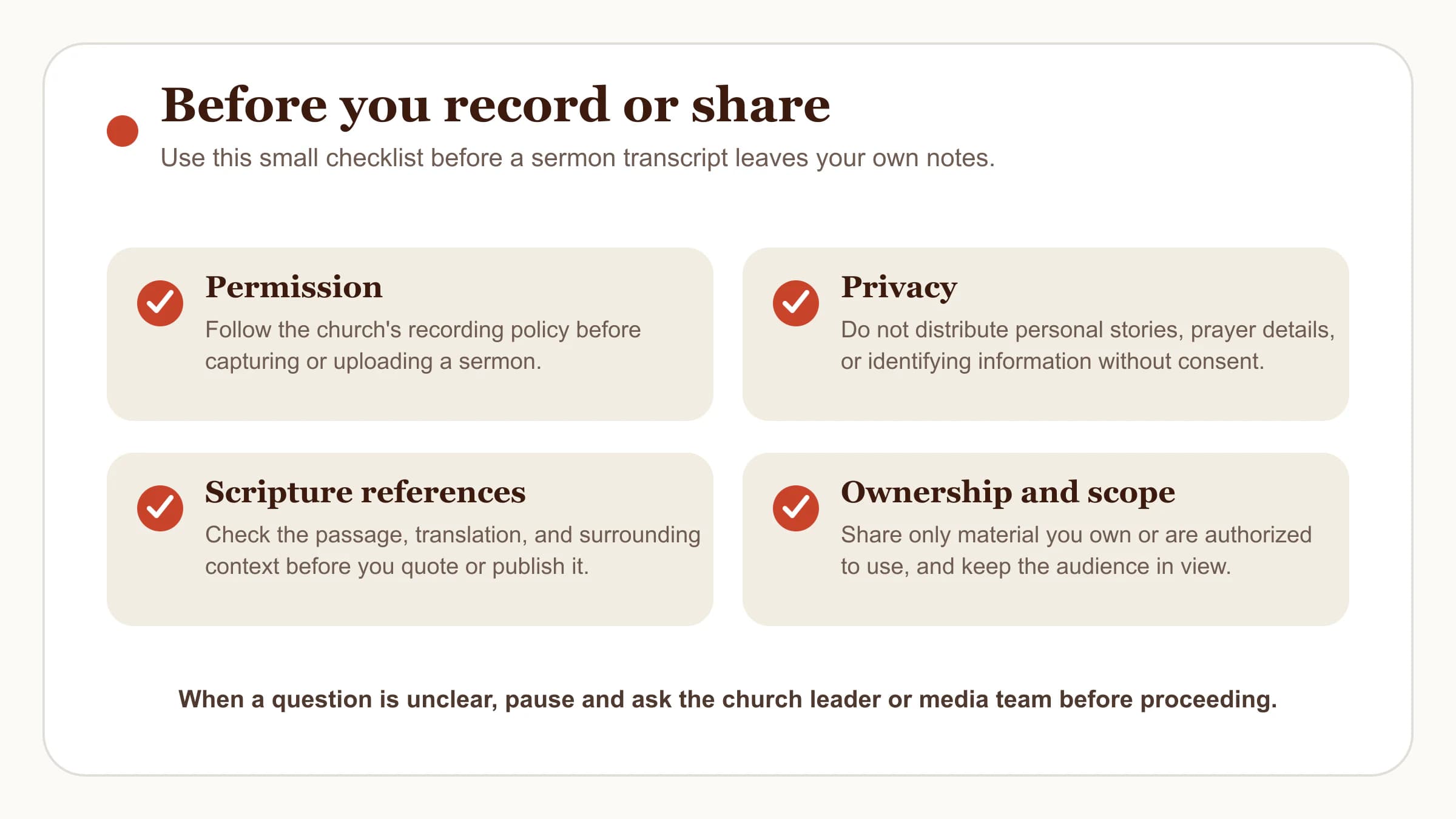
When a question is unresolved, pause rather than publish quickly. A pastor, media lead, or church administrator can clarify local policy better than a generic app setting can.
Turn one sermon into a week of study
Even without a dedicated app, start with one independent practice: set aside ten minutes on Monday. Re-read the main passage, correct one reference from your notes, write two observations from the sermon, and name one response to carry into the week. That keeps the text and its context ahead of the tool.
If you want a structured place for that work, Bible Note's sermon notes feature is designed to organize a message into notes and follow-up study material. A sermon notes template can also give you a simple structure for the passage, main idea, questions, and next step. These are supports for study, not substitutes for the sermon, Scripture, or church community.
Frequently asked questions
What is the best app for transcribing sermons?
The best fit depends on your job: live personal recording, an existing file, service captions, a formal text, or weekly study follow-up. Start with the output you need, then verify the tool's current policy and capabilities.
Can I record a live sermon with a transcription app?
Many apps can record live audio, but recording a sermon should follow your church's policy and the speaker's direction. Ask before recording or sharing when the answer is not already clear.
Can I transcribe a sermon from YouTube or another video source?
Some services accept uploaded audio, video, or source links, but you should use only material you own or are authorized to process. Check the service's current supported inputs and the church's distribution policy first.
Do I need a sermon-specific transcription app?
A sermon-specific app can help when you want timestamps, Scripture-aware notes, and a study workflow. A general transcription service can be a better fit when you only need text or captions from an existing authorized recording.
Should I publish an AI-generated sermon transcript without review?
No. Compare it with the audio, verify names and Scripture references, remove private details, and make sure the final text fits the intended audience before you publish or distribute it.
Sources
Bible Note sermon transcription and Bible Note sermon notes, first-party product references, accessed August 10, 2026.
Sermon Keeper, Proclaim sermon transcription, TurboScribe, and Rev, official product pages accessed August 10, 2026.
W3C Web Accessibility Initiative: Transcripts, NIST AI RMF Core, FTC app-security guidance, and U.S. Copyright Office author guidance, accessed August 10, 2026.
Editorial status
Written and edited by Hans Keller for Bible Note. Sources, Scripture context, dates, and practical limitations are checked before publication.

About the author
Hans Keller
Editorial & Content Lead
Bible Study & Sermon Learning Content Editor
Hans helps Christians turn sermons and Scripture study into clear notes, thoughtful questions, and faithful next steps.
His work helps listeners and group leaders carry a sermon or study beyond the meeting: back to the passage, into clearer questions, and toward one practical response for the week.
Read with Scripture open
Use this guide alongside the full biblical passage and the practices of your local church. Interpretive details can differ across Christian traditions.
See more Bible Note on Google
Add Bible Note as a preferred source to help find our Bible study guides more easily in Google Search.