


You can leave Sunday worship with a passage in mind and still wonder on Tuesday what the preacher meant by one sentence. Bible Note gives that question somewhere to go. The app brings Bible reading and questions, sermon capture, organized notes, flashcards, and devotional follow-up into one mobile study path. You can also begin with a passage when there is no sermon to record.
Here is the shortest useful test: open the passage, write your question, and see whether the answer helps you return to the surrounding text. If you later record a sermon with permission, see whether its note helps you do the same. That tells you more about the app's fit than collecting a stack of generated summaries.
Bible Note publishes this review of its own app. We assess its public feature descriptions and first-party interface images against the choices a Scripture reader or sermon listener needs to make.
Verdict: who should choose Bible Note?
Bible Note is a compelling choice for a reader who wants one place to explore a verse, revisit a teaching, and carry a question or prayer into the week. Its strongest feature is continuity: a passage can lead to a question; a sermon can lead to a checked note and a short devotional sequence. A group leader gains a starting point for discussion, while an individual reader can use the Bible and question tools without ever recording a service.
Start free if you want to explore that path. Some heavier use and advanced note tools require a subscription; the value of paying depends on whether you regularly return to recordings and use the generated follow-up. Readers whose main requirement is a particular study edition, detailed original-language resources, a fully offline library, or publication-ready church media should keep a specialist companion for that job.
What using Bible Note can look like in an ordinary week
Imagine a passage from Sunday's sermon leaves you with a real question. Before you open an app, write down the passage, the phrase you want to understand, and one observation from the surrounding paragraph. That small step gives you a way to judge any answer you receive.
Monday: start with the passage and ask a better question
In Bible Note's Bible reading and study flow, you can open a passage and select a verse. To begin from a reference or a printed Bible, open New Note, choose Bible Study, then enter the reference or tap Scan Bible. The scan takes you from the page in front of you into an explanation. Check that it captured the right passage before reading on.
From a selected verse, the screen offers Study, Interpret, and Ask; choose the action that matches your question. Study gives you a place to explore the passage, while Interpret or Ask can help you name the point you want to check. The Bible study chat also works from a saved sermon note. A useful question is specific: “What is happening before this verse, and how does that change the way I read it?” Follow a suggested reference into the Bible text, then compare the answer with the paragraph around it. If the question concerns a debated doctrine, bring the passage and the explanation to a trusted pastor or study leader. The strongest use of chat is a more focused next reading.
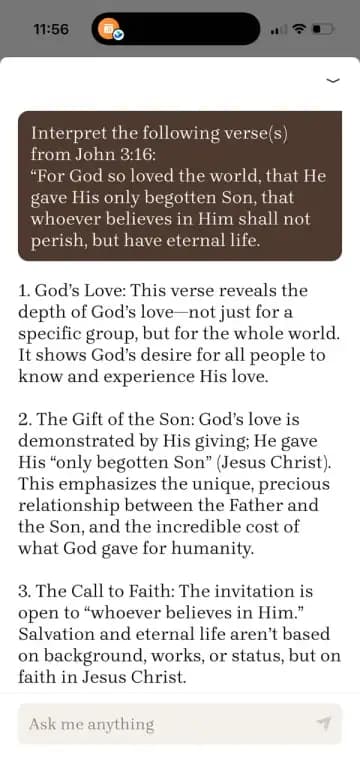
The John 3:16 text shown in this Bible Note screen is from NASB1995. Scripture quotations taken from the (NASB®) New American Standard Bible®, Copyright © 1960, 1971, 1977, 1995 by The Lockman Foundation. Used by permission. All rights reserved. www.Lockman.org.
A general web search can surface many disconnected answers. Bible Note's advantage for this task is that the question begins beside the passage or the note you already have, with Scripture references you can inspect. Its answer remains a study prompt; your translation, the passage's context, and your church's teaching still matter.
Sunday into Tuesday: capture teaching and make a usable note
If your church permits it, start a recording during the sermon, or import an authorized audio file or supported link afterward. The sermon transcription flow produces a transcript linked to the recording. Timestamps let you revisit a fast-spoken reference or a sentence that sounded different in the summary. Check the words and the cited passage before using them in a group handout.
The sermon notes flow is where the product becomes more than an audio archive. Its structured summary gathers key points and Scripture references, while the note view keeps a path into related material. If a preacher mentions several passages in quick succession, first identify the sermon’s main text. Put supporting references beneath it. Then write the central idea in your own words and one question you still have. This gives an AI-produced outline a useful human shape.
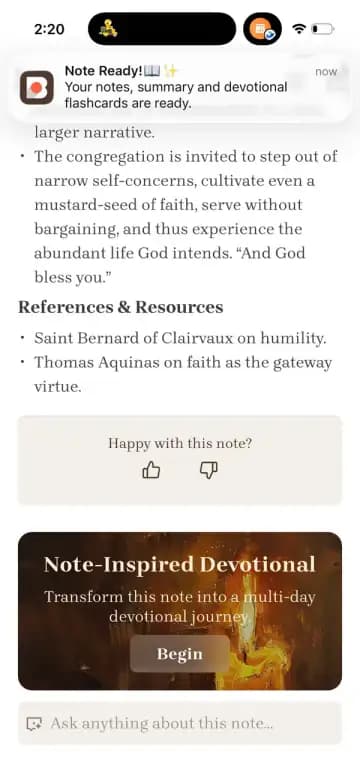
Flashcards turn selected ideas into short questions for review. For a small group, one card might ask which passage was central to the message; a second might ask how the preacher supported an interpretation. The group can then open that passage together. Generated discussion questions make preparation faster, but a leader should choose the two or three that actually suit the group and make room for an unscripted answer.
Midweek: choose a daily reading or follow the note onward
Bible Note offers a daily devotional experience with Scripture, reflection, audio, and prayer. A sermon note also has a Note-Inspired Devotional card: tap Begin to see a five-day sequence, then open a day for its reading, audio option, and prayer. These serve different moments. The daily reading is a simple starting place when you have no particular sermon to revisit. The note-based sequence helps you return to teaching you heard and ask what deserves another look.
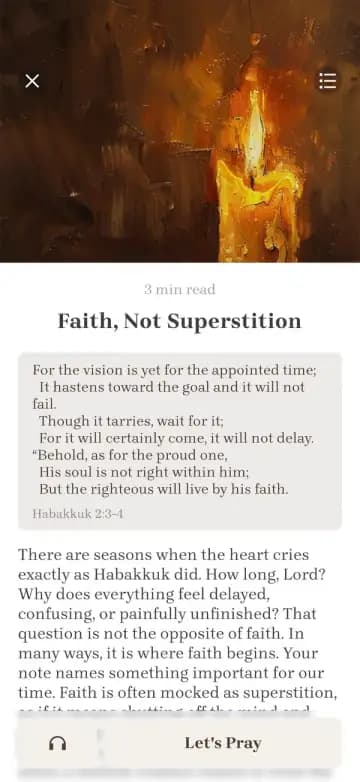
The Habakkuk 2:3–4 text shown in this Bible Note screen is from NASB1995. Scripture quotations taken from the (NASB®) New American Standard Bible®, Copyright © 1960, 1971, 1977, 1995 by The Lockman Foundation. Used by permission. All rights reserved. www.Lockman.org.
Suppose Monday's note asks how a sermon connected patience to its main passage. On Tuesday, open the next devotional day, read that passage in context, and write down whether the reflection answers the original question or leaves you with a better one. Listen when reading is difficult; write a one-sentence response when you have time. A prepared prayer can help you begin, while your own words may name the actual people and circumstances on your mind. The sequence is useful when it returns you to Scripture over several days, even if you finish only part of it.
Where the app earns its place, and where you still do the work
The most persuasive part of Bible Note is the connected journey. The same reader can move from a printed page or Bible screen to a question, from an authorized sermon to a transcript, and from a note to reflection. That reduces the effort of finding where an insight went. It also gives a small-group leader a practical order: passage, claim, supporting references, question, response.
There are three places to slow down:
At the source. Names, quotations, and Scripture references in audio transcripts can be misheard, especially with music, distant microphones, or overlapping voices. Replay the relevant moment and read the passage in your chosen translation.
At the interpretation. An AI answer or devotional may sound settled where Christians hold different readings. Identify what the text says, what is an interpretation, and what is a proposed response before you teach from it.
At the sharing step. Permission to listen to a sermon differs from permission to record, upload, quote, or distribute it. Ask your church about each intended use. Keep personal prayer requests and sensitive group disclosures private unless the people involved have agreed to share them.
These checks are especially important for leaders. The app can prepare a useful draft; the leader remains responsible for the passage, the people, and the final discussion.
Devices, free access, and when a subscription makes sense
Bible Note's first-party site links to iOS and Android downloads. The web feature pages explain the workflow, while the fuller reading, chat, recording, and saved-note experience lives in the app. If your routine depends on a desktop-only workspace, test the mobile path before moving your notes. If offline reading or playback is essential, test those exact actions in the app before you rely on it away from a connection.
You can start the Bible chat and sermon-note experience for free. Some advanced features and heavier usage require a subscription. Before paying, check the current in-app offer for the price in your region, renewal period, trial terms if shown, and the limits on the features you plan to use. That matters more than a generic price tag: a weekly group leader may value regular sermon imports and follow-up, while someone asking occasional passage questions may find the free starting point sufficient.
A practical evaluation needs only two tasks. Ask one question about a passage you know well enough to check. Then, if permitted, make one sermon note and use it again later in the week. If the references and follow-up draw you back to the text each week, the paid tools have a clear job. If you mainly ask occasional questions, keep the free route and your simpler note habit.
Who benefits most, and when another resource helps
A reader building a daily habit gets a gentle place to begin: an open passage, a question, a devotional reading, and a short prayer. Keep a Bible translation you trust close so you can read the wider chapter. If you are choosing among broader reading and study tools, our best Bible study apps guide compares that job across options.
A sermon listener benefits when the recording is permitted and the real goal is review, not merely storage. Timestamps, notes, and flashcards give a message a second life on Monday. A printable sermon notes template remains a good choice if you prefer pen and paper or a screen-free Sunday. Our sermon note apps guide helps if you want to compare different ways of capturing and revisiting a message.
A group leader or teacher can use a recap and discussion prompts to prepare, then choose questions that send the group back to the passage. For detailed word studies, commentary traditions, or a curriculum with specific edition requirements, use a specialist Bible library alongside the note. When a pastoral issue touches grief, safety, or a consequential personal decision, talk with a trusted person who knows the situation.
A church media team should use its established recording, captioning, consent, and publication workflow for public material. Bible Note can help an authorized person study a message, while a formal archive needs editorial and rights checks before anything goes out.
Can Bible Note answer Bible questions reliably?
It can offer a useful first explanation and further references, especially when the question starts with an open passage or sermon note. Read the cited text and its surrounding paragraph. If an answer turns a single verse into a broad promise, or settles a disputed teaching too quickly, compare a trusted commentary and ask a qualified teacher. That habit makes the chat more valuable because it sharpens your question for the next conversation.
Can I use it without recording a sermon?
Yes. Open a passage, enter a reference, ask a question, or use the daily devotional. Recording is one route into the product. A new Bible reader can begin with a passage and a question; a longtime listener may get more value from connecting a weekly sermon to notes and midweek reflection.
Should I share generated notes with my small group?
Share a reviewed note when your church's permission and the group's privacy expectations allow it. Check quotations and references against the recording and Bible text, remove personal details, then send a short recap with the main passage and two open questions. A concise, checked note gives absent members a way into the discussion without presenting generated text as the teacher's final word.
Summary
Bible Note makes most sense when you want to keep Scripture study, authorized sermon notes, and devotional follow-up close together. Begin with one passage and one honest question. If you can record or import a sermon with permission, make one note and revisit it later in the week. The app earns a place in your routine when its references, questions, and reflections help you return to Scripture and the people with whom you study.
Explore Bible Note's full feature overview and use the current app offer to decide whether the free starting point or a subscription fits the way you actually study.
Editorial status
Written and edited by Hans Keller for Bible Note. Sources, Scripture context, dates, and practical limitations are checked before publication.

About the author
Hans Keller
Editorial & Content Lead
Bible Study & Sermon Learning Content Editor
Hans helps Christians turn sermons and Scripture study into clear notes, thoughtful questions, and faithful next steps.
His work helps listeners and group leaders carry a sermon or study beyond the meeting: back to the passage, into clearer questions, and toward one practical response for the week.
Read with Scripture open
Use this guide alongside the full biblical passage and the practices of your local church. Interpretive details can differ across Christian traditions.
See more Bible Note on Google
Add Bible Note as a preferred source to help find our Bible study guides more easily in Google Search.