
On Sunday the message felt clear. By Tuesday the outline is buried somewhere in a notebook, the passage you meant to revisit is half-remembered, and the application you wanted to pray through has slipped behind the week’s errands. Many readers searching for the best Bible study apps are really asking a quieter question: which tool will help me keep doing the study I already care about?
The honest answer is that the best app for Bible study depends on the work that comes next. Revisiting a sermon, building a daily reading rhythm, opening a commentary library, following a guided theme, and slowing down over a single word are different jobs, and each one has a strong candidate. This guide compares five apps by those jobs, so you can choose the one that fits a habit you will actually repeat.
Before you compare anything, give yourself one week of practice that needs no download. Read a short passage each day, including the paragraph around it, and write one observation and one question in your own words. That small loop is the habit every app on this list should serve, and it gives you a fair way to test any tool you try.
How we chose these Bible study apps
We reviewed the official product materials for each app on August 14, 2026, and selected five options that clearly serve different study tasks. A daily reader and a word-study researcher need different things, so we evaluated each app against the job its own documentation describes.
Starting material: Does your study begin with a sermon or class, a daily reading plan, a passage, a reference library, or a guided course?
Study action: Do you need to listen, highlight, take notes, compare translations, look up a word, follow a theme, or prepare a discussion question?
Return path: Can the tool help you revisit a passage or note later in the week while keeping the source you need to check close at hand?
Documented limits: What does the official description leave with you — interpretation, permission for recorded material, and the judgment to check generated output?
Two ground rules keep this list fair. First, every factual description below comes from the app’s own official materials, and we name those sources at the end of the article. Second, you will find no prices, star ratings, download counts, or invented rankings here. Features and policies change, so confirm the current details on each product’s official page before you commit to a workflow.
Quick guide: which app fits your study habit?
If you want the short answer, match your situation to one of these five starting points:
Bible Note: Your study begins with an authorized sermon, class, or teaching, and you want reviewable notes and a midweek follow-up.
YouVersion Bible App: You want a dependable daily reading and listening habit with highlights, bookmarks, and personal notes.
Logos: You want a connected library of commentaries, notes, reading plans, and original-language lookups.
BibleProject: You learn well through guided themes, reflection questions, classes, and a multimedia library.
Blue Letter Bible: You want verse-by-verse word study with lexicons, interlinear views, and parallel Bibles.
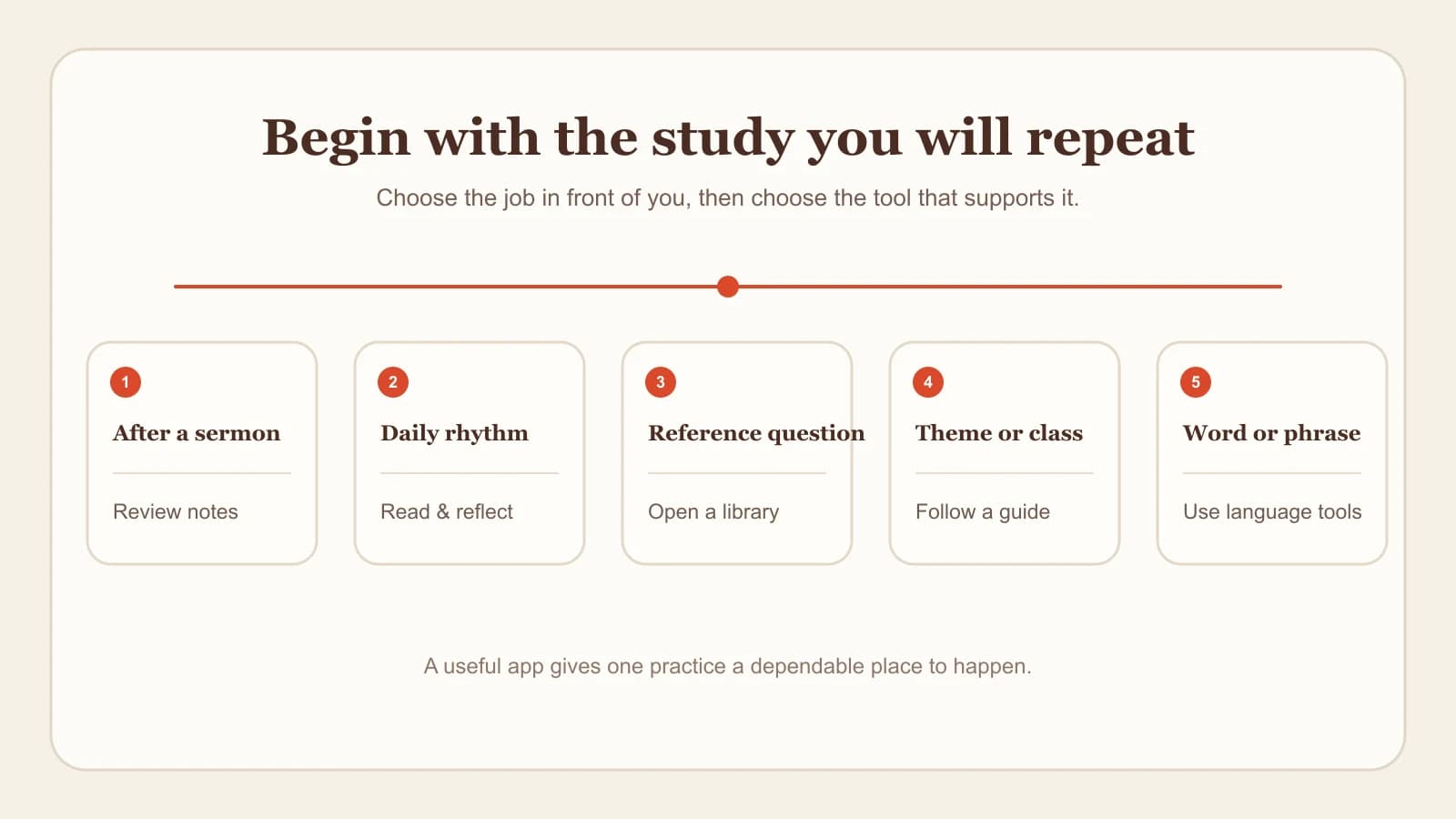
The sections that follow explain what each fit looks like in practice, along with one limitation worth knowing for every app.
Bible Note: best for turning sermons into reviewable study notes
If your study often begins with a sermon, class, or teaching you are authorized to record or import, Bible Note is our primary recommendation. It is built for exactly that moment: you stay present while you listen, and afterward you organize the message, its Scripture references, and your own notes into material you can revisit during the week. For readers who want that sermon-to-study follow-up, it is the first option we would put in front of you.
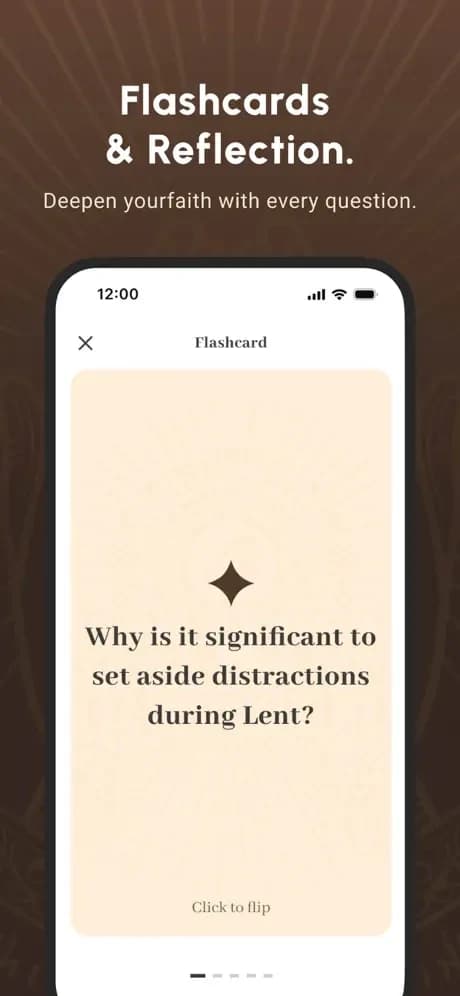
The workflow starts with recording or importing supported sermon material, always with the appropriate permission from your church or teacher. Bible Note recognizes Scripture references in the material and helps you build structured notes around them, then turns the same material into review formats: flashcards for recall, devotional plans for the days ahead, and discussion questions you can bring to a group. Treat every generated note as a draft, and check it against the recording and the biblical text before you rely on it or share it.
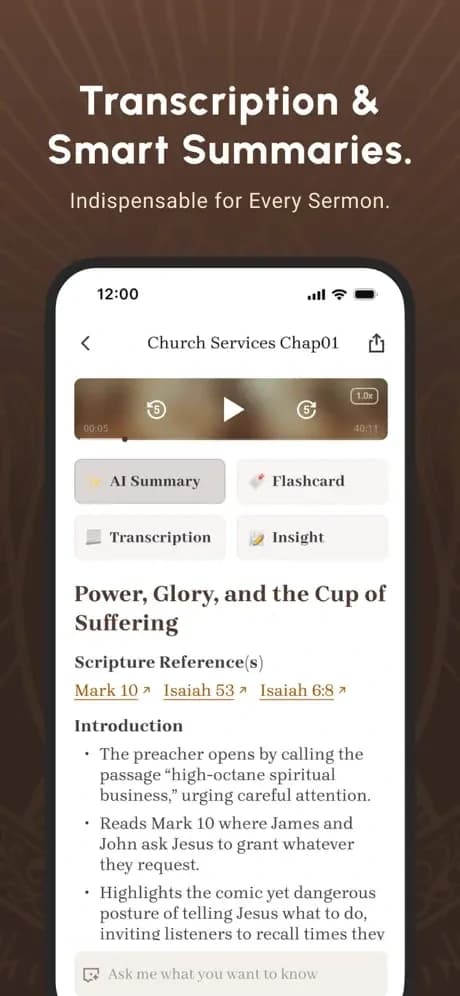
When a question grows out of a passage or one of your saved notes, the Bible Note Bible study chat lets you ask it in context. Responses display the Scripture references behind an answer and mark the difference between interpretation and AI inference, so you can see what comes from the text and what comes from the model. That labeling matters, because AI output can be wrong; the references are there so you can open the passage and verify.
Later in the week, the flashcards created from your sermon note give you a light way to revisit the passage, the main points, and your next step before Sunday comes around again.
Choose Bible Note when the sermon-to-study loop describes your week. If your main need is a broad daily reading plan, a large reference library, a guided course, or a specialized original-language workspace, one of the four apps below will serve you better as a first tool, and some readers reasonably pair two apps for different jobs.
Four other Bible study apps to consider
Each of these established apps leads with a different strength. The descriptions rely on the official materials cited in the Sources section, and each entry closes with the scope you should keep in view.
YouVersion Bible App: best for a daily reading and listening rhythm
YouVersion’s official Bible App page describes reading or listening to Scripture, audio and offline access for travel or commutes, and personal tools such as highlights, bookmarks, notes, and Bible-version comparison. If your goal is a steady daily habit — opening the text each morning or listening on the way to work — YouVersion is a natural home base. The scope to keep in view: the documented strengths center on personal reading, listening, and annotation, so a reader who later needs a connected commentary library or a sermon-to-notes workflow would add a second tool for that specific job.
Logos: best for a connected reference library
Logos’ official mobile product information describes notes, commentaries, reading plans, Greek and Hebrew lookups, a Passage Guide, and a library that stays connected across your study. For readers preparing to teach, tracing a theme across several resources, or working a question that needs more than one reference work, Logos' connected library is the attraction. The scope to keep in view: this description reflects Logos’ mobile product information, so confirm on the current official page how the features you care about work on the device you plan to use, and expect a deeper tool to ask more of your attention than a simple reading app.
BibleProject: best for guided themes and structured learning
BibleProject’s official app page describes reflection questions, classes, annotated resources, videos, podcasts, articles, and progress tracking. For a reader who wants to see how a biblical theme develops or how a book is structured before studying the details, the guided path in BibleProject can turn a vague intention into a clear sequence. The scope to keep in view: guided learning is the documented strength here, so a reader whose main need is verse-by-verse lexical work or personal sermon notes will want a different tool for those tasks, and you should confirm current language and device availability on the official page.
Blue Letter Bible: best for close word study, verse by verse
Blue Letter Bible’s official Android page describes Hebrew and Greek lexicons, interlinear text, dictionaries, word searches, commentaries, notes, highlights, and parallel Bible views. For slowing down over a single verse and inspecting the words and resources around it, Blue Letter Bible is a rich workbench. The scope to keep in view: the feature list cited here comes specifically from the official Android page, so verify capabilities on any other platform separately. And a lexicon entry illuminates a question; the sentence, paragraph, and whole passage still carry the meaning.
Choose the app by the practice you will repeat
Most readers end up with too many apps because they compared feature lists while their actual week went unexamined. Seven days of real study give better evidence than an afternoon of comparison, so walk through this short sequence before you download anything.
Name your starting point. A sermon you want to revisit, a morning reading habit, a hard question, a theme you want to trace, or a word you want to study each point toward a different first tool.
Choose one repeatable action. Highlighting a verse, writing one question, replaying part of a message, looking up one word, or finishing one guided session are all legitimate. Pick the action you will genuinely repeat three times this week.
Keep the text ahead of the tool. Read the passage in context before you open any app’s explanation of it, so the tool answers questions you actually have.
Give the habit a light prompt. If a fresh passage would help, a random Bible verse generator can suggest one, with the surrounding context still doing the real work.
Plan the follow-up with your people. A solo reader might save one note to revisit on Friday; a group leader might turn one observation into small-group Bible study questions for the next meeting.
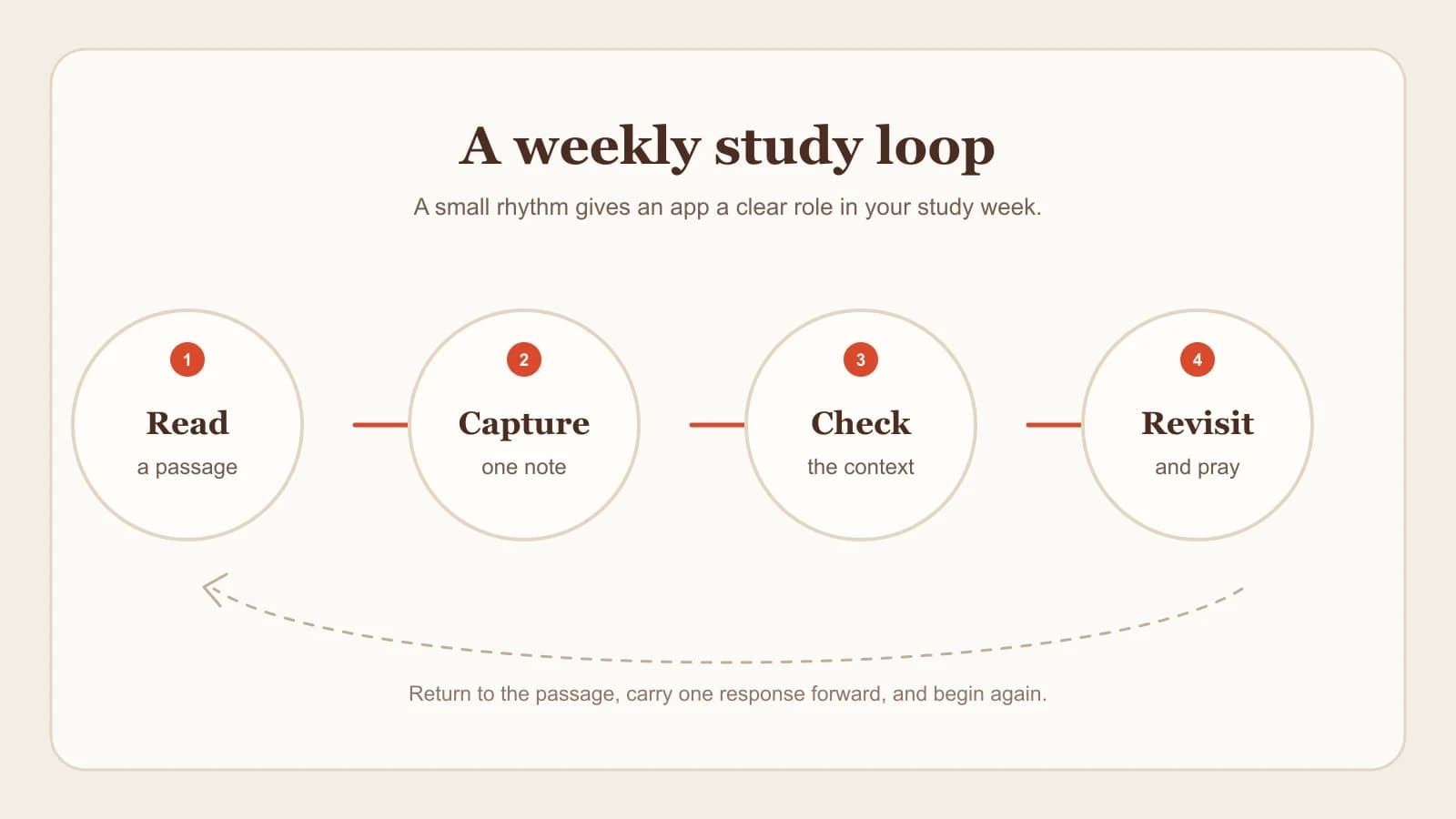
Whichever app you land on, the measure is simple: does it make this loop easier to repeat next week?
What an app cannot settle for you
Every app on this list can save time, surface resources, and help you return to material. Several decisions stay with you and your community no matter which tool you choose.
Interpretation: A summary, search result, or word lookup offers input for your study. The meaning of a passage still comes from reading it in context and weighing significant questions with trusted teachers and your church.
Verification: Check quotations, references, transcripts, and AI-generated answers against the biblical text and, where relevant, the original recording. Generated output can be confidently wrong.
Permission: Record or import a sermon, class, or group discussion only when you have the appropriate permission, and follow your church’s policy for private material such as prayer requests. This guide covers study practice only; for legal questions where you live, ask a qualified professional.
Application: An app can help you remember a question. Deciding whether a response is wise, timely, and loving toward another person remains yours.
Frequently asked questions
Which Bible study app should I try first?
Start from your most common study moment. If it is a sermon you want to revisit, begin with Bible Note. If it is a daily reading habit, begin with YouVersion; for reference work, guided themes, or word study, look at Logos, BibleProject, or Blue Letter Bible respectively.
Is one Bible study app enough for everything?
Many readers use one main app and add a second for a specific job, such as daily reading plus occasional word study. Choose the fewest tools that support a practice you will actually repeat.
Can I rely on an app’s summaries or AI answers about a passage?
Treat them as starting points. Open the referenced passage, read the surrounding context, and bring substantial questions to trusted teachers and your church before you rely on any generated answer.
What should I do before recording a sermon in an app?
Confirm that your church or teacher permits recording or importing the material, and follow their policy for anything private. Process only material you are authorized to use, and check transcripts and notes against the source.
How do I keep app-based study connected to my church?
Bring what you study into shared life: discuss a question with a friend, prepare for your small group, or ask a pastor about a passage you are weighing. Apps organize material; community helps you interpret and apply it.
Sources
Bible Note sermon notes and Bible Note Bible study chat, first-party feature pages, accessed August 14, 2026.
YouVersion Bible App, official product page, accessed August 14, 2026.
The Logos Bible Study Mobile App, official product page, accessed August 14, 2026.
BibleProject App, official product page, accessed August 14, 2026.
Blue Letter Bible for Android, official product page, accessed August 14, 2026.
Editorial status
Written and edited by Hans Keller for Bible Note. Sources, Scripture context, dates, and practical limitations are checked before publication.

About the author
Hans Keller
Editorial & Content Lead
Bible Study & Sermon Learning Content Editor
Hans helps Christians turn sermons and Scripture study into clear notes, thoughtful questions, and faithful next steps.
His work helps listeners and group leaders carry a sermon or study beyond the meeting: back to the passage, into clearer questions, and toward one practical response for the week.
Read with Scripture open
Use this guide alongside the full biblical passage and the practices of your local church. Interpretive details can differ across Christian traditions.
See more Bible Note on Google
Add Bible Note as a preferred source to help find our Bible study guides more easily in Google Search.