
A quiet Bible-reading habit needs both a passage you can return to and a clear account of what will interrupt it. Begin with Bible Note if your goal includes asking about the passage, saving a verse note, or continuing a devotional or sermon study; its Bible Study Chat supports that path. For the narrower requirement of a documented no-ads promise, YouVersion is the strongest candidate in this review: its official Bible App page says “100% free. No ads or purchases ever.” Bible Note has no verified ad-free claim here, so do not choose it on that promise alone.
A KJV app whose store title says “No Ads” is a narrower publisher-labelled option, while Bible Gateway Plus describes an ad-free paid tier. Those are different claims. Decide whether your main need is an uninterrupted Bible text, a follow-up study workflow, or both.
How we evaluated these options
We used Semrush search-interest research to see what readers mean by an ad-free Bible app, then compared the official publisher page and app listings for the options here. We give the most weight to a clear publisher statement about ads and distinguish a free app promise from a paid ad-free tier or a claim in an app title. Translation access, account requests, plans, notifications, and social features also matter when the real goal is a quiet reading screen. These sources describe publisher terms; check the current wording and the chapter view on your own device before choosing. An ad-free claim does not establish privacy practices or the absence of every in-app prompt.
Quick picks
Bible Note for study around a passage: lead with its verse questions, notes, and devotional or teaching follow-up when those are the real job. Its ad-free status is unverified; pair it with a reader carrying a scoped no-ads promise if that is essential.
YouVersion Bible App for an explicit free no-ads statement: its publisher makes the clearest current claim in this review.
Bible King James KJV - No Ads: a specifically named US iOS single-translation candidate; verify its current listing and screen.
Bible Gateway Plus: an ad-free claim attached to a paid tier, useful if its translation and study tools justify that tier. The free app has no no-ads promise established here.
Product reviews
Bible Note: first for passage follow-up, without an ad-free claim
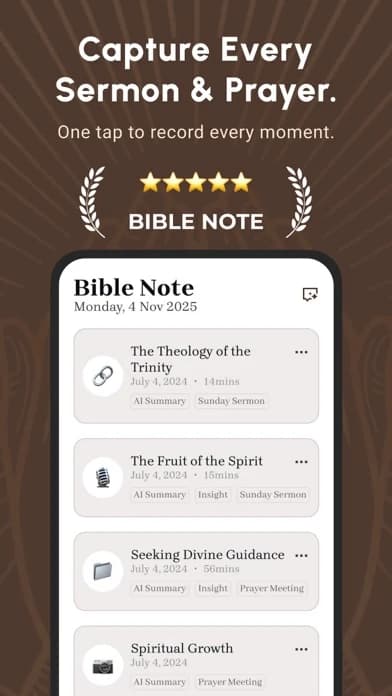
Best for: someone who wants a reading question to become a note, a checked explanation, or a devotional and teaching follow-up on a supported app device.
What the current evidence supports: Bible Note's first-party pages and current store descriptions show verse notes, study questions, version comparison or highlighting, and Bible Study Chat. Its broader feature overview also describes daily devotional and sermon-study paths. These sources do not establish that Bible Note is an ad-free Bible reader.
How it fits a quiet routine: read the passage first and jot the question it raises. Use Bible Note to ask about context and save the answer for later checking, or return to a note from authorized teaching. If avoiding every advertising surface is the deciding requirement, choose a reader with an explicit, appropriately scoped claim for the actual reading screen and use Bible Note for the separate study step.
Strengths: It keeps questions, Scripture references, and later reflection connected instead of leaving the reader with a quiet but isolated text. Daily devotional material and notes may support a gentle return to the passage without making a notification or streak the measure of faithfulness.
Limitations and conditions: We cannot call Bible Note ad-free, guarantee no prompts, or infer privacy practices from a quiet-looking screen. The current evidence also does not establish all Bible text or devotional features on every device. Check the app's actual reading experience and data terms for your situation; generated explanations need Scripture and context checks.
Fit verdict: Lead with Bible Note for study and follow-up; use an explicitly no-ads reader when the no-ad claim itself is the selection gate.
YouVersion Bible App
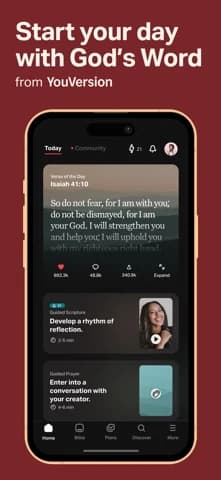
Best for: someone who wants a broad Bible reader backed by an explicit publisher no-ads statement.
What the current evidence supports: Bible.com's official app page currently says “100% free. No ads or purchases ever.” The US iOS listing describes many versions, reading plans, notes, selected offline text, and optional social features. The no-ads wording is the publisher's statement, not our independent cross-device audit.
Strengths: This is the clearest evidence for the query, and the broad reader means the reader need not choose between a Bible text and a separate lightweight verse app. Notes and reading plans may be useful if they serve an existing habit.
Limitations and conditions: No advertising does not mean there are no invitations to join a plan, sign in, share, or enable notifications. Check the translation you need and how the current reading view behaves with your settings. A child or shared-device user should inspect account and social controls separately.
Fit verdict: Start with YouVersion when an explicit no-ads promise and broad translation access are the main requirements. Reverse that recommendation if a required edition is unavailable or another kind of prompt violates your actual quiet-reading rule.
Bible King James KJV - No Ads
Best for: an iPhone reader content with KJV text and willing to verify a narrower publisher claim.
What the current evidence supports: A current US App Store result names the app “Bible King James KJV - No Ads.” That is a publisher-controlled title on a specific iOS listing, not an independent guarantee covering Android, future releases, or every app surface. Its store page also needs a current check for access terms before selection.
Strengths: A single-translation reader may be a simpler fit when KJV is already the edition a person or group uses. The promise is at least explicit in the product name, so it can be checked against the actual experience.
Limitations and conditions: A title says little about prompts, analytics, other versions, or offline behavior. Do not assume the app is the same publisher's product as another similarly named “KJV” reader. Match the developer and listing before installing, then read a whole chapter with the phone connected and disconnected.
Fit verdict: Let this outrank a large general app if KJV is the right text and the current app actually meets your interruption boundary. Skip it when a different translation is essential.
Bible Gateway and Bible Gateway Plus
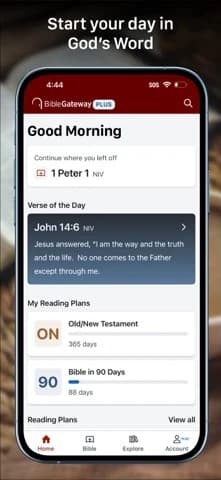
Best for: a reader who also wants the Gateway translation and study environment, and is willing to assess a paid ad-free tier.
What the current evidence supports: The official Bible Gateway app page describes a broad translation library, audio, notes, and Bible Gateway Plus as an ad-free experience with added study resources. The earlier US iOS listing also ties an ad-free experience to Plus. Neither source establishes that the free app has no ads.
Strengths: A person who already uses its passage search or study materials can evaluate one familiar app rather than migrate notes merely for the absence of ads. Plus has a stated ad-free condition to check before paying.
Limitations and conditions: An ad-free tier is not a free no-ads promise. Verify which screens and platforms the current offer covers and whether reminders, upgrade prompts, or study invitations count as interruptions for you. Do not purchase solely because a screenshot looks uncluttered.
Fit verdict: Consider Bible Gateway Plus when the full study environment is useful enough to justify its current terms. If a free explicit no-ads promise is the deciding criterion, YouVersion has stronger evidence in this review.
Decide what you want removed from the screen
Try writing one plain sentence before installing another app: “I need to read a chapter without third-party advertising,” or “I want no prompts of any kind during my child's reading,” or “I will pay for a study library, but I do not want banners beside the text.” Those sentences produce different picks. A publisher can truthfully say “no ads” while still offering a plan, a sign-in path, a donation link, or a reminder. Those may be useful features for one reader and unwanted interruptions for another.
Bible Note earns the first recommendation when a quiet reading session should lead to a saved passage question or devotional reflection. It cannot satisfy the no-ads gate on current evidence, so the separate reader must carry that promise. For private individual reading, the first test is the whole chapter, not the opening screen. Start in the required translation, move between chapters, search a reference, and see which prompts appear. If YouVersion's official promise and actual reading view match your preference, the broader app has the advantage. If a narrower KJV reader feels calmer and its text is the edition you use, that app may win even though its evidence is a store title rather than a broader official policy page.
For a child or shared phone, no ads is only one part of the decision. Check whether the app offers social feeds, external links, account creation, purchases, notifications, or a route away from the passage. Use the phone's own family or device controls where appropriate. A no-ads label does not certify age suitability or privacy, and the current evidence here does not review those controls hands-on.
For a church kiosk or shared study device, continuity matters. Decide whether the screen should reopen at a specific passage, whether sign-in is acceptable, and whether a network outage changes the view. Test the device in its actual locked-down mode. If an account or network-dependent prompt interrupts the shared session, a locally available text or even a printed passage may be more reliable than a polished ad-free claim.
Verify the claim without mistaking one quiet screen for a policy
Read the current publisher wording and note its scope: app, free tier, paid tier, or a named platform. Then inspect the same passage in the actual app while signed out if that is how it will be used, and again after any necessary sign-in. Look at the reading screen, chapter navigation, search, and settings. Distinguish a third-party advertisement from an internal feature invitation or a system notification. Turn notifications off if they are optional and unwanted. Recheck after a major update, because a claim captured on October 4 is not a promise about every later build.
A lack of ads does not establish privacy practices. If you plan to save personal notes or a child's account information, read the current privacy and sharing settings on their own merits. Avoid treating a single ten-minute session as an audit of every condition. The useful outcome is a specific, observed fit for your own device and habits.
Does “no ads” also mean no prompts or notifications?
No. An ad-free statement addresses advertising within its stated scope. It does not promise a screen free of every invitation or an absence of device alerts. Those differences matter because “quiet” means something different to a solo reader, a child, and a church using a shared screen.
Think of the interruptions separately:
Advertising: a scoped publisher promise can answer the no-ads question for the app or tier it names. It says nothing by itself about other messages.
Invitations: reading plans, sign-in, or sharing prompts may still be welcome to a personal reader and distracting on a shared device.
Alerts: reminders can interrupt someone even when the Bible passage itself displays no ads. Their relevance depends on how and where the device is used.
A reader who wants only to avoid third-party advertising can weigh the publisher's claim heavily. Someone preparing a child’s reading session or a kiosk needs the broader interruption boundary described earlier. That difference can reverse the pick without making either reader's preference unreasonable.
Is an ad-free Bible app necessarily private?
No. Advertising and privacy answer different questions. An app may show no ads while still asking for an account, storing notes, or offering sharing; the absence of ads alone establishes none of those data practices. The privacy decision becomes more consequential when notes include prayer requests or a child uses the device.
Before saving personal material, check three separate things: what the current policy says is collected, whether the note or account can be shared, and what a person using the same device can see. Keep sensitive group details out of a shared note unless everyone has agreed to that use. Choose the app for its reading experience only after its data and sharing terms also fit your situation.
Summary: choose the quiet reading screen you need
Start with Bible Note for the question, note, or devotional step that follows reading; its ad-free status remains unverified. If the reading screen itself must carry an explicit free no-ads promise, begin that part in YouVersion. A KJV-only reader or Bible Gateway Plus may fit a narrower translation or paid-study need once its terms match your device. Let the no-ads evidence govern the screen choice and Bible Note's study strengths govern the follow-up.
Editorial status
Written and edited by Hans Keller for Bible Note. Sources, Scripture context, dates, and practical limitations are checked before publication.

About the author
Hans Keller
Editorial & Content Lead
Bible Study & Sermon Learning Content Editor
Hans helps Christians turn sermons and Scripture study into clear notes, thoughtful questions, and faithful next steps.
His work helps listeners and group leaders carry a sermon or study beyond the meeting: back to the passage, into clearer questions, and toward one practical response for the week.
Read with Scripture open
Use this guide alongside the full biblical passage and the practices of your local church. Interpretive details can differ across Christian traditions.
See more Bible Note on Google
Add Bible Note as a preferred source to help find our Bible study guides more easily in Google Search.