
A verse can feel familiar on Monday and disappear when you try to say it on Thursday. Start with Bible Note when the line arose in reading or authorized teaching and you want to connect a study question, a flashcard, and the surrounding passage. Its sermon-note workflow supports teaching-derived cards, while Bible Study Chat helps revisit the meaning you are trying to remember. For translation-exact repetition and a verified schedule, add a dedicated memory app: The Bible Memory App has the clearest documented set of typing, audio, visual practice, and scheduled review, subject to purchase conditions. Bible Note is a study-led first choice, not a verified spaced-repetition library.
Choose the memory task before the app
There are at least three jobs hidden inside “memorize a Bible verse.” First, you may need to recognize a line when you see it. Second, you may want to recall its exact wording unaided in a named translation. Third, you may want to explain its meaning in context to a classmate or group. A tap-to-reveal card can help with the first job and still leave the second unfinished. A perfect recitation can still miss the third. Choose an app that makes your actual task possible and keep a Bible reader or passage view nearby.
For a family or class, also decide who selects the passage and which translation everyone will use. “Share a set” and “make individual progress” are different promises. Check the exact group controls before asking others to join.
How we evaluated these Bible memory apps
We used Semrush search-interest research to understand what readers seek in a memory app, then compared official app listings and Bible Note's documented features. We looked for practice that moves beyond recognizing a line to recalling its words, a way to return for later review, clear translation and purchase conditions, and a route back to the full passage. These picks are grouped by purpose because exact recitation, passage reading, and reviewing a teaching question need different tools. Publisher descriptions explain the available modes; they do not show which app will improve a particular person's retention.
Quick picks by purpose
Bible Note for meaning and teaching recall: turn an authorized sermon or study question into a flashcard, check its Scripture reference, and return to the passage. No verified spaced schedule or exact-text drill is claimed.
The Bible Memory App: dedicated verse library and scheduled recall with several practice modes; verify PRO and Bible-reader entitlements.
VerseLocker: missing-word, typing, first-letter, listening, and scheduled practice under its current listed access model; verify translation availability.
YouVersion Bible App: reading plans and passage-linked notes when reading is the central habit; add another tool for systematic drills.
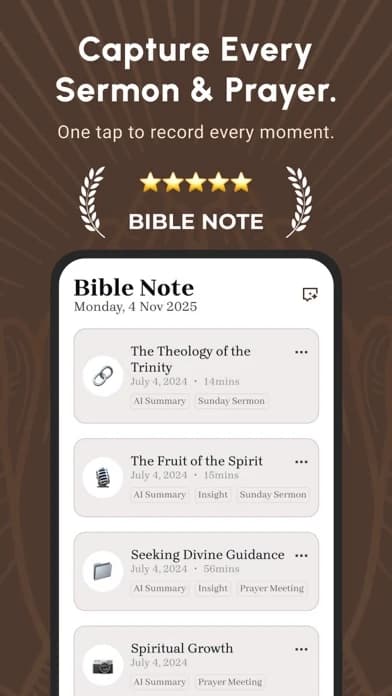
Bible Note: remember the verse with its teaching question
Best for: a reader who wants to revisit why a verse mattered in a permitted sermon or study session, not merely recognize its wording on a card.
What the current evidence supports: Bible Note's sermon notes describe authorized capture or import, timestamped transcript review, recognized Scripture references, and flashcards generated from notes. First-party Bible study material and Bible Study Chat support verse questions and follow-up explanation. Daily devotional and note-derived reflection paths are also described in the broader feature overview.
How to use it here: after reading the biblical paragraph, keep a question about the verse beside the reference. If the line came from a sermon, return to the authorized recording and check what the teacher actually said. Make a card that prompts the point you need to recall, then open the passage to check both the words and your interpretation. The benefit is continuity between Sunday teaching, midweek review, and discussion with another person.
Strengths: A flashcard can carry the teaching thread instead of reducing a verse to a detachable slogan. Study questions and the saved note give a way to revisit meaning when the wording is familiar but the context has faded.
Limitations and who should add a specialist: Generated cards or explanations can misstate the source and need checking. Bible Note does not have a verified spaced-repetition schedule, full translation-specific verse library, or exact-word typing drill in the sources reviewed. A learner preparing word-for-word recitation should add a dedicated memory tool with the right edition and access terms. Recording or importing teaching requires permission.
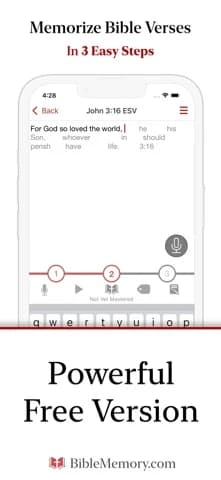
The Bible Memory App: a structured verse library
Best for: someone who wants to build a long-running personal or group memory collection.
What the current evidence supports: Its US Apple listing describes first-letter typing, picture and flash-card practice, audio, a verse library, optional review notifications, and a spaced review system. It identifies PRO-only visual/audio features and a separate in-app purchase for its Bible reader; a customizable schedule is also marked PRO.
Strengths: The typed prompt can expose where you rely on recognition instead of recall. Collections and scheduled return make a growing set manageable.
Limitations and who should skip it: Confirm the translation and access tier before importing a large collection. Its listing claims offline use, but test your intended mode and Bible text offline. Skip it if a purchase-dependent mode is essential and you have not verified that tier, or if you only need occasional reading-plan reminders.
VerseLocker: several ways to practice one line
Best for: a reader who wants to move from word clues to a full spoken or typed recitation.
What the current evidence supports: Its US Apple listing describes listening on a loop, filling missing words, typing, first-letter prompts, scheduled review, and collections. The publisher currently describes it as free with no ads, subscription, or premium tier. That is listing evidence, not a promise about future terms.
Strengths: Different prompts can reveal whether you know the words or only recognize their shape. A family or class could use a common collection if the current sharing controls fit its needs.
Limitations and who should skip it: Check the version you use, the exact group flow, and how collections leave the app. A translation's presence in a listing does not settle your intended text rights or every device option. The listing says nothing that proves a better retention outcome than another tool.
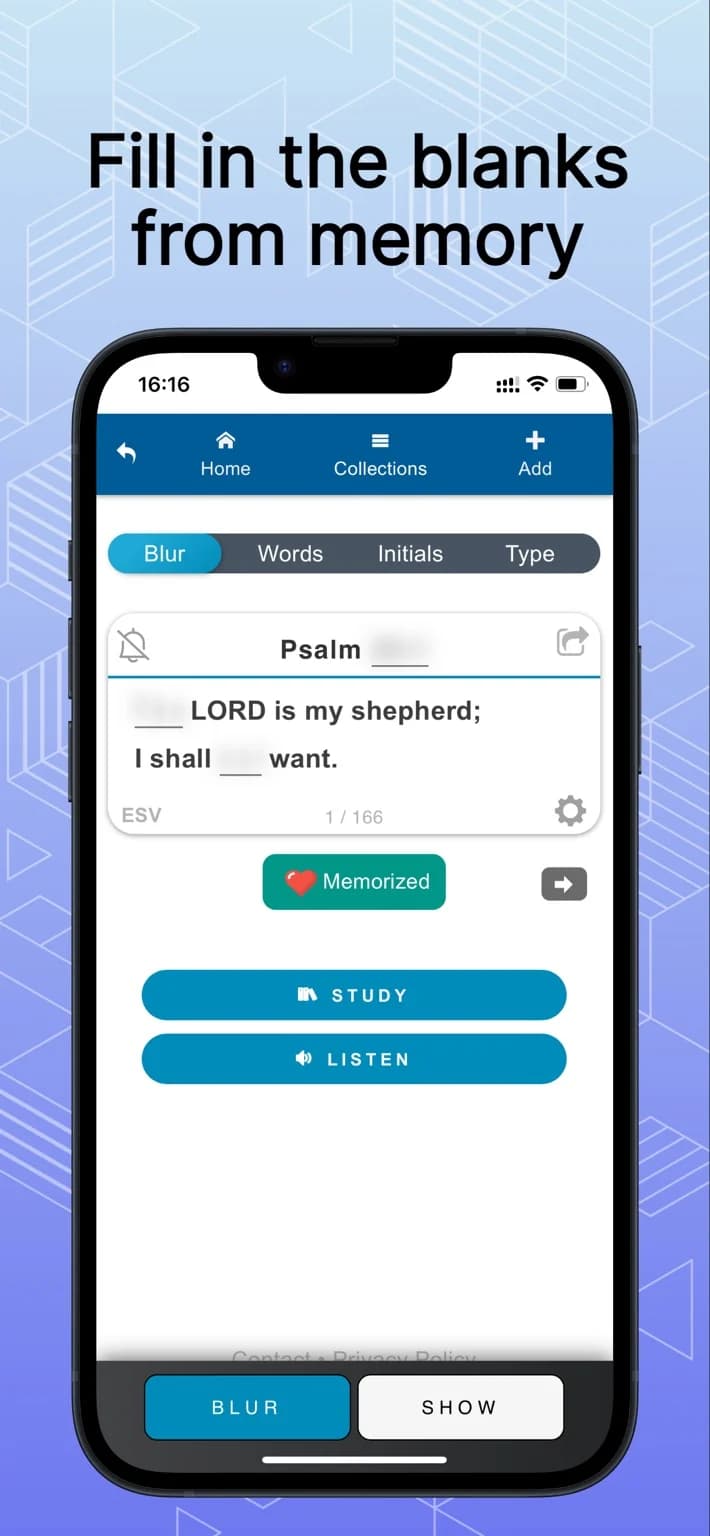
The captured iPhone listing image illustrates a missing-word drill. It does not verify its scheduling or group controls.
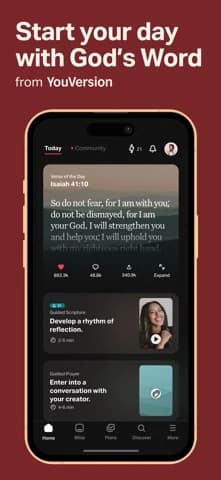
YouVersion Bible App: read the passage around the verse
Best for: someone already reading a plan who wants to keep the chosen verse tied to a chapter.
What the current evidence supports: Its captured US iOS listing describes plans, notes, highlights, bookmarks, audio controls, and some offline text. It does not document a dedicated spaced-repetition system in that capture.
Strengths: Returning to the chapter in YouVersion is easy when the reading habit is already there. Keep a note about why this line matters in its paragraph.
Limitations and who should skip it: Reading and highlighting can create familiarity without unaided recall. If exact recitation is your goal, add a drill and schedule instead of treating a highlight as practice. Check which translation and text are available offline.
A session that tests memory without losing context
Choose one short unit in a translation you can open legally in your chosen app. Read the paragraph first and mark where the line sits in the author's argument or story. Close the text. Recite or type the line without hints; if you stall, uncover only the next prompt rather than rereading the whole line. Open the named translation and check wording, including small connecting words. Then say in plain language what the line contributes to the paragraph. Schedule another attempt later without treating a streak as a measure of faithfulness.
Suppose you remember a promise-sounding sentence but cannot explain who is speaking or to whom. That is a cue to reread the surrounding passage before adding another repetition. A memory card can carry the reference, your translation, one context note, and the next review date. Keep your paraphrase distinct from the actual verse text; do not circulate a remembered paraphrase as a quotation.
Two readers will make different choices
Bible Note should come first when a learner wants the verse, its teaching question, and a later review note to stay together. For exact repeated recitation, the specialized practice mode becomes decisive. A commuter who can only review by listening should examine the audio mode and its current purchase terms before choosing The Bible Memory App; VerseLocker's listed loop may suit the same task if it works on their device. A class leader choosing a shared verse set should test group setup and translation consistency first. Those needs can reverse a solo reader's pick. Someone who wants to review last Sunday's teaching rather than recite a translation exactly has a reason to choose Bible Note's narrow flashcard workflow instead.
If the line came from a sermon, keep the passage and the teaching question together after checking the text. Bible Note can hold that follow-up; a dedicated memory app remains the better pick for exact, repeated verse recall.
Which translation should I memorize?
For shared recitation, use the translation your class or church has chosen so everyone is learning the same wording. For personal practice, choose an edition you can keep using with your reading and memory tools. A different rendering is not necessarily a memory error; it may be a translation difference.
The choice has three consequences:
Shared wording: one named edition gives a class a fair basis for practicing together. If the group uses another edition, align with that choice before treating different wording as a mistake.
Passage access: memory is more useful when the same edition is available for reading beyond the isolated line. A drill-only text may call for a separate Bible reader.
Text rights: access to a translation in one app does not establish permission to copy its words into another app or distribute a group set. Check the current terms for that use.
If no group edition governs the choice, steady access to the full passage and lawful use of the text matter more than a particular app's preferred wording. Keep the translation decision stable enough to practice, while leaving room to compare another rendering during study.
Can an app tell me I understand the verse?
No. A drill can show whether you recalled the words stored in the app. Understanding asks what those words contribute to the sentence, who is speaking or being addressed, and how the surrounding passage shapes the meaning. A perfect recitation can still leave those questions unanswered.
After a recall attempt, open the full paragraph and explain the line in your own words without replacing the verse with your paraphrase. If the line sounds like a promise, ask who receives it in the passage before applying it to yourself or a group. Bring a disputed interpretation to a teacher or group with the text open. Use the app's result as a recall check, not a grade for spiritual insight.
What about private or group collections?
Keep a shared verse set as simple as the group needs. A common reference and named translation help everyone practice the same text; names, prayer details, and personal stories are a separate privacy decision. A collection meant for class practice does not need to become a record of each person's circumstances.
Before inviting others, agree on who chooses verses and whether members can see or change the shared material. Inspect the current sharing and account controls of the chosen app instead of assuming that “group” means private. If those controls do not fit, distribute only the references and translation for now, and let each person keep private reflections in a separate place.
Summary: choose recall practice and keep the passage
Begin with Bible Note to connect a passage, a checked study question, and teaching-derived flashcards. Add The Bible Memory App when you need its scheduled verse library, or consider VerseLocker for its listed practice modes and current access model. Keep YouVersion or another lawful Bible text available for the full paragraph. Bible Note leads the meaning-and-review workflow; an exact-text memory specialist supplies the repetition it has not been shown to provide.
Editorial status
Written and edited by Hans Keller for Bible Note. Sources, Scripture context, dates, and practical limitations are checked before publication.

About the author
Hans Keller
Editorial & Content Lead
Bible Study & Sermon Learning Content Editor
Hans helps Christians turn sermons and Scripture study into clear notes, thoughtful questions, and faithful next steps.
His work helps listeners and group leaders carry a sermon or study beyond the meeting: back to the passage, into clearer questions, and toward one practical response for the week.
Read with Scripture open
Use this guide alongside the full biblical passage and the practices of your local church. Interpretive details can differ across Christian traditions.
See more Bible Note on Google
Add Bible Note as a preferred source to help find our Bible study guides more easily in Google Search.