
Bible Note is our first pick when prayer begins with Scripture or follows a permitted prayer meeting: its Daily Devotional includes a prayer response, and its study and meeting notes can help a reader return to the passage and agreed themes. PrayerMate and Echo Prayer are more specialized for recurring request lists; Pray.com is a guided-audio candidate. Protect another person's words before recording anything. Bible Note's meeting summary is not a confidential request-management system or permission to circulate private disclosures.
How we evaluated these apps
We used Semrush search research to see which prayer-app needs readers bring to this category, then compared available publisher information and app listings. The choices are grouped by purpose: keeping a personal request list, revisiting shared requests, following guided audio, or praying from a Bible passage. We weighed reminders and prompts against the more consequential question of who can see a request. Official descriptions identify offered features, but they cannot establish that a service will protect a particular disclosure. Check the current sharing, notification, and deletion controls before recording anyone else’s details.
Quick picks
Bible Note: Scripture-led devotional prayer and authorized meeting follow-up; keep sensitive requests out without consent.
PrayerMate: rotating cards for recurring people and topics.
Echo Prayer: categorized requests, reminders and answered-prayer tracking.
Pray.com: publisher-described guided prayer plans and audio; check current access.
YouVersion: Scripture-led prayer cards and notes.
Start with the kind of help you need
“Prayer app” can mean several different things. Bible Note begins with Scripture and a prayer response in its Daily Devotional; with permission, it can also help a group revisit the passage and agreed themes from a meeting. A request list helps you return to people and topics you have promised to remember, while a guided audio prayer offers a spoken pattern for beginning. A shared list adds a custody question: who may see each request, for how long, and with whose permission? PrayerMate and Echo Prayer are list-oriented candidates; Pray.com is a guided-content candidate. No format makes a prayer more sincere or more likely to be answered.
For a private household list, a few broad categories may do more good than detailed records. “A friend recovering” can be enough to remind you to pray. A name, diagnosis, medication, and family history may be information you were trusted to hear, not information you were given permission to store in a third-party app. A pastor or group leader may need a separate process for confidential care. Product descriptions do not settle that pastoral responsibility.
Decide what belongs in a digital request
Before entering a request, sort it into one of three working categories. Personal: your own prayer or a general topic that does not identify someone else. Shared with permission: a request the person has clearly agreed may be named to a specified circle. Confidential: health, pastoral, family, abuse, financial, or other details that should stay out of an ordinary group list. This is a practical disclosure rule, not a claim about any app's encryption or legal compliance.
Use the smallest useful detail. If you are praying for a neighbor after surgery, you may only need initials and “recovery.” Do not infer that a request may be posted to a group because it was spoken in a meeting. Ask the person what can be shared, with whom, and whether updates may be added. A reply such as “please keep this between us” means the app's group feature is the wrong place for it. For an urgent safety, medical, or pastoral matter, seek appropriate local help and follow your church's care process; a reminder app is not an emergency channel.
The listing terms “private,” “PIN,” and “share” describe features or publisher positioning. They do not prove how data is encrypted, backed up, retained, exported, or removed. Before entering identifiable requests, inspect the current privacy policy and the actual controls in your installed version: default visibility, invited members, notifications on a lock screen, export, deletion, and what happens when someone leaves a group. If you cannot answer those questions, use a lower-detail note or paper. That is a reason to change the tool, not to stop praying for the person.
Product reviews
Bible Note
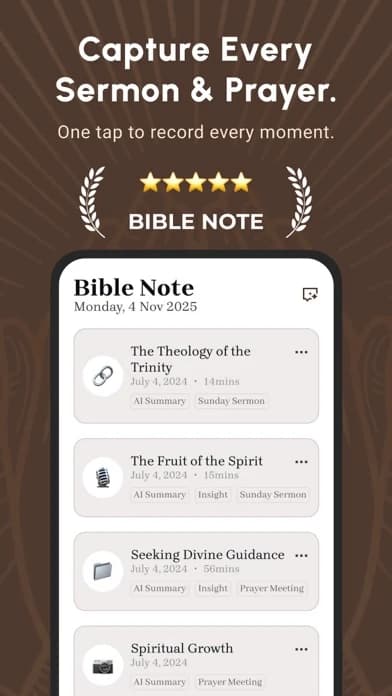
Best for: praying from a passage and revisiting the Scripture and agreed themes of an authorized prayer or study meeting.
What the evidence supports: First-party Daily Devotional materials include Scripture, reflection and a prayer response. Bible Note's summary materials describe prayer-meeting themes and requests alongside Scripture references; authorized recording or import, transcription and organized notes support later review.
Strengths: A reader can start with a passage in the Daily Devotional, read it in context, and use the suggested prayer to find words for a personal response. After a meeting that participants agreed could be recorded, a leader can review the summary, correct its Scripture references and retain only the prayer themes people permitted. Sermon notes show the organized teaching-note path; Bible Study Chat supports a question about the passage. That offers a meaningful way to return to a gathering without turning prayer into a score or a data collection exercise.
Limitations and conditions: The summary may contain sensitive disclosures or errors. Consent to speak in a room is not consent to record, transcribe or share a request. Remove private details unless the person authorized their use, check generated text before any sharing, and follow your church's care process for confidential matters. Bible Note is not a dedicated private request ledger with verified group-permission, deletion or security controls for this purpose.
Fit verdict: Start with Bible Note for Scripture-shaped personal prayer or an authorized, carefully reviewed meeting follow-up. Choose PrayerMate or Echo Prayer when recurring request management is the main job; use a paper or lower-detail record when confidentiality is uncertain. See Bible Note's features for its broader study and devotional path.
PrayerMate
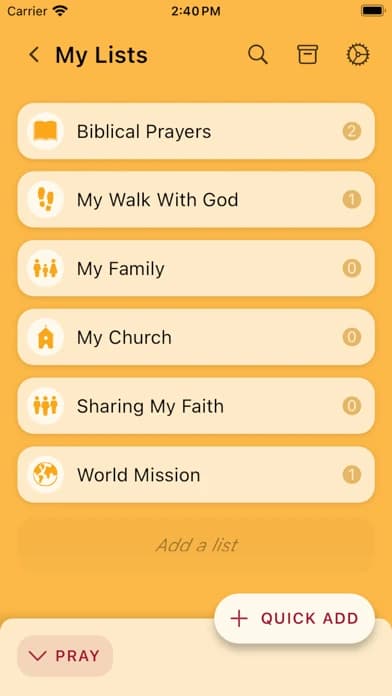
Best for: organizing recurring prayer requests.
What the evidence supports: The current US iOS PrayerMate listing describes categories for people and topics, daily index cards, manual prayer points, and updates from churches or Christian organizations.
Strengths: PrayerMate is the clearest fit here for a request-list workflow: recurring topics can give a household or individual a place to return instead of relying on memory alone.
Limitations and conditions: Its listing describes optional private small-group sharing, a PIN, contacts entry, and import/export. A PIN is not proof of end-to-end encryption or suitability for pastoral confidences; inspect current policy and sharing before adding names.
Fit verdict: Request-list pick for recurring people and topics; keep sensitive details minimal and verify current sharing and backup behavior.
Pray.com

Best for: guided prayer and audio-oriented use.
What the evidence supports: Pray, Inc.’s current US iOS listing describes daily and nightly prayers, customizable prayer plans, and Bedtime Bible Stories. It is a guided-content choice, not evidence of superior privacy or outcomes.
Strengths: The US iOS publisher listing describes daily and nightly prayers, prayer plans, and audio content. That makes it a candidate when spoken prompts matter; check which content is accessible in the current version before relying on a particular plan.
Limitations and conditions: The listing establishes prayer plans and audio content on current US iOS, not the treatment of sensitive prayer data or which items require payment. Review the current policy and purchase screen before adding personal details.
Fit verdict: Listing-led candidate for guided prayer and audio, subject to current access terms; not the overall pick for tracking a private list of people and requests.
Echo Prayer
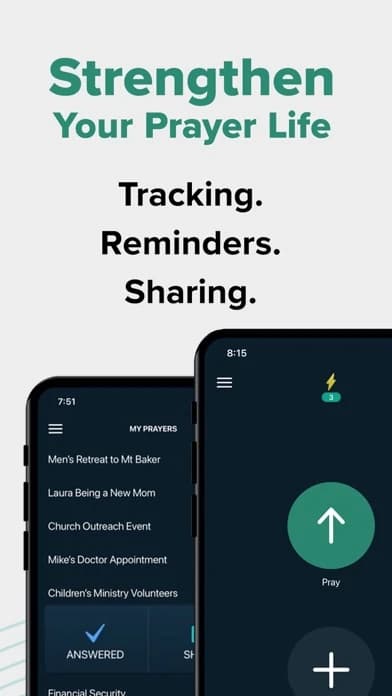
Best for: saving and revisiting prayer requests.
What the evidence supports: The current US iOS Echo Prayer listing describes categorized prayer lists, reminders, sharing requests, and marking prayers answered.
Strengths: Echo Prayer is another request-centered option for saving and revisiting prayers. Its usefulness depends on whether the reminder and sharing model matches the sensitivity of the requests you carry.
Limitations and conditions: Its listing says many features are free and Echo Plus+ unlocks all features after a trial. The word “private” in publisher copy does not establish an independent data-security audit; inspect current sharing and billing before entering requests.
Fit verdict: Choose it when categorizing and revisiting requests matter most; inspect sharing scope before adding another person’s details.
YouVersion

Best for: prayer that begins with a Bible passage and stays near it.
What the evidence supports: The current US iOS YouVersion listing describes prayer cards and lists that can be private or shared with friends, alongside Bible reading and plans.
Strengths: A general Bible app can support prayer when the practice starts with a passage, plan, or saved verse. It is a weaker fit for a dedicated request ledger or guided prayer audio.
Limitations and conditions: Its listed prayer cards can be private or shared with friends, so inspect the current visibility setting before recording a request about anyone else. It is not a dedicated confidential-care workflow.
Fit verdict: Choose it for Scripture-led prayer; choose a request-list or audio app for those specific jobs.
How should a small group handle a shared prayer request?
Give the group one agreed version of the request and make it easy to correct. The earlier privacy section covers permission and what belongs in a digital list. Shared prayer adds a continuing responsibility: an approved sentence can become outdated, and the audience can change as members join or leave.
Suppose a member first says, “Please pray about my upcoming appointment,” and later asks the group to use a different wording. The leader should replace the old wording in the shared list rather than append a detailed update beside it. If the member says the matter is now private, stop circulating it to the group. An update from a third person should not be treated as fresh permission to add names or health details.
Agree on a simple group practice for requests that change:
Keep one person responsible for asking the requester about updates and correcting the shared wording.
Read a request back to the person before expanding its audience, especially when a new member joins.
Treat “answered,” “ongoing,” and “remove this” as the requester's description or a list-management choice, not as the group's verdict on God's action.
Echo Prayer's described sharing and reminder features may support an approved group list if its controls fit that practice. PrayerMate's rotating cards serve an individual returning to recurring topics. A group seeking an opening audio prompt has a separate need that Pray.com may address; it does not decide who may hear a member's story.
Which prayer app fits your own routine?
Choose according to what you need to return to, not the number of features on the store page. Bible Note fits a Scripture-led prayer response or a reviewed record of an authorized meeting's themes. PrayerMate fits a recurring personal list; Echo Prayer is a candidate when categories and reminders will help you revisit requests. Pray.com is the guided-audio option when spoken prompts matter most, subject to the specific content's access terms. YouVersion fits a routine that begins with a Bible passage and uses its prayer cards.
For example, someone who prays through a handful of names each morning may need a rotating list, while a person who wants spoken prompts on an evening walk has a different job. If your need is to pray from a passage, begin with the passage itself and keep the request brief enough to revisit. If the request concerns someone else, decide whether it should be recorded at all before choosing an app. No interface gives consent on that person's behalf; when details are sensitive or visibility is uncertain, keep less information or use a private paper reminder.
Summary: Choose the tool after deciding what to record
Start with Bible Note for prayer rooted in a passage and for a careful return to an authorized meeting's Scripture and shared themes. Its daily prayer prompt belongs beside the text; a generated meeting summary needs human review and consent before anyone else sees it. Bible Study Chat can help pursue a passage question. Choose PrayerMate or Echo Prayer when you need a recurring request list, or Pray.com when guided audio is the primary need. If a request is confidential, decide what may be recorded before choosing any app.
Editorial status
Written and edited by Hans Keller for Bible Note. Sources, Scripture context, dates, and practical limitations are checked before publication.

About the author
Hans Keller
Editorial & Content Lead
Bible Study & Sermon Learning Content Editor
Hans helps Christians turn sermons and Scripture study into clear notes, thoughtful questions, and faithful next steps.
His work helps listeners and group leaders carry a sermon or study beyond the meeting: back to the passage, into clearer questions, and toward one practical response for the week.
Read with Scripture open
Use this guide alongside the full biblical passage and the practices of your local church. Interpretive details can differ across Christian traditions.
See more Bible Note on Google
Add Bible Note as a preferred source to help find our Bible study guides more easily in Google Search.